<xml version="2.0" encoding="UTF-8"?>
<feed xmlns="http://www.w3.org/2005/Atom" xmlns:dc="http://purl.org/dc/elements/1.1/">
  <link href="https://brandontoner.ca/blog.xml" rel="self" type="application/atom+xml"/>
  <author>
    <name>Brandon Toner</name>
  </author>
  <id>https://brandontoner.ca/blog.xml</id>
  <title>Brandon Toner: Blog</title>
  <rights>Copyright (c) 2023, Brandon Toner</rights>
  <published>2023-11-19T08:00:00-04:00</published>
<entry>
        <id>https://brandontoner.ca/bettingodds</id>
        <link href="https://brandontoner.ca/bettingodds"/>
        <title>Using Betting Odds to Estimate Favourites</title>
        <published>2024-03-16T11:00:00-03:00</published>
        <updated>2024-03-16T11:00:00-03:00</updated>
    <content type="html">
        <![CDATA[
           <p>Betting odds are interesting to know while watching a sporting event. Often, the bookkeeper (the betting site) has good data to size up the matchups to set a good betting line. This betting line is useful as a spectator to help assess who is the favourite/underdog, and by how much. </p>
                
                <h2>How to interpret betting odds</h2>
                
                <p>Example from the 2024 BKT Tires World Women’s Curling Championship Draw 1 Matchup (Canada vs Sweden):</p>
                
                <ul>
                <li>Sweden Women: 2.75</li>
                <li>Canada Women: 1.40</li>
                </ul>
                
                <p>Explained by ChatGPT:</p>
                
                <blockquote>
                    <p>Sweden Women (2.75): This means that if you bet 1 unit of currency (e.g., 1 dollar, 1 euro, etc.) on Sweden Women to win, and they do win, you would receive a payout of 2.75 units. So, if you bet $1 on Sweden Women and they win, you would receive $2.75 in total (your original $1 stake plus $1.75 in profit).</p>
                
                    <p>Canada Women (1.40): This indicates that if you bet 1 unit of currency on Canada Women to win, and they do win, you would receive a payout of 1.40 units. So, if you bet $1 on Canada Women and they win, you would receive $1.40 in total (your original $1 stake plus $0.40 in profit).</p>
                </blockquote>
                
                <p>You can also take these payout odds, and convert them to “implied probabilities” of winning:</p>
                
                <blockquote>
                    <p>
                        Sweden Women (2.75):
                        Implied probability = 1 / 2.75 ≈ 0.3636 or 36.36%
                    </p>
                
                    <p>
                        Canada Women (1.40):
                        Implied probability = 1 / 1.40 ≈ 0.7143 or 71.43%
                    </p>
                </blockquote>
                
                <p><strong>But that doesn’t add up to 100%...</strong></p>
                
                <p>That’s because betting sites make money on bets placed, called the “house edge”. </p>
                
                <blockquote>    
                    <p>Subtract the total implied probability from 1 to find the house edge: 1−1.0779 ≈ -0.0779</p>
                
                    <p>The house edge in this case is approximately -0.0779 or -7.79%. This means that, theoretically, the bookmaker expects to keep around 7.79% of all bets placed over time as profit.</p>
                </blockquote>
                
                <p>By using this information, you can easily calculate the “implied probability” based on the betting odds, adding some interesting data to your experience in watching the game. </p>
        ]]>
    </content>
</entry>
<entry>
        <id>https://brandontoner.ca/goodcrib</id>
        <link href="https://brandontoner.ca/goodcrib"/>
        <title>What makes a good cribbage player?</title>
        <published>2024-03-13T23:00:00-03:00</published>
        <updated>2024-03-13T23:00:00-03:00</updated>
    <content type="html">
        <![CDATA[
           <p>Once you know the rule and the flow of the game, crib is a lot of fun. There is enough luck involved so that anyone can win if you are dealt favourable hands and good cuts — but good crib players will win <em>more often</em> through good decision making to optimize their chances. </p>

            <p>There is more to a good cribbage player than picking the right cards, though. Beyond strategy, flow-of-play and style add to the overall experience. </p>

            <h2>Qualities of a good cribbage player</h2>

            <ul>
                <li>Quality decision-making in selecting hands</li>
                <li>Strategic selection of cards in the pegging round</li>
                <li>Speed of decision-making</li>
                <li>Accuracy of counting points</li>
                <li>Speed and fluidity of counting points</li>
                <li>Maintaining the flow of turns</li>
                <li>Navigating the board</li>
                <li>Use of cribbage phrases &amp; banter</li>
                <li>Quality shuffling</li>
                <li>Sportsmanship</li>
                <li>Overall style of play</li>
            </ul>

            <h2>Elaborations:</h2>
            
            <em>Quality decision-making in selecting hands</em></p>

            <ul>
            <li>Is it your cut or theirs?</li>
            <li>What are the odds of getting a favourable cut?</li>
            <li>Get a sense of the “odds” for common decisions.</li>
            </ul>

            <p><em>Strategic selection of cards in the pegging round</em></p>

            <ul>
            <li>Set good bait. e.g. Consider 10s are 30% of the deck... use this to bait your opponent into playing into your hand. “Assume they play a 10”.</li>
            <li>Be mindful of runs, and 3-of-a-kinds.</li>
            <li>Keep an eye on the count... 15s and 31s.</li>
            <li>Watch their reaction to the cut for cues into their hand.</li>
            </ul>

            <p><em>Speed of decision-making &amp; counting</em> </p>

            <ul>
            <li>Quickness communicates skill and experience. Quick decisions are impressive and promote a smooth and brisk gameplay.</li>
            <li>Be careful not to miss things for sake of speed, though! Especially in muggins.</li>
            </ul>

            <p><em>Accuracy &amp; flow of counting hands</em></p>

            <ul>
            <li>Count your hand in a systematic and rhythmic way to keep things clear. For both you, and your opponent.</li>
            <li>Count 15s first, then runs, pairs, and flushes. Finish with the Right Jack. <em>How you articulate the count matters.</em></li>
            <li>e.g. “15-2, 15-4, 5-6-7 and a pair for 9”</li>
            </ul>

            <p><em>‌Maintaining the flow of turns</em></p>

            <ul>
            <li>Know who’s crib it is &amp; who’s “go” it is in pegging.</li>
            <li>Reach for the deck for the cut when it’s their crib. Lead with first play in pegging. Count first.</li>
            <li>Attention and mindfulness make for a smoother and more enjoyable game. Even better to keep things straight despite conversation and distractions.</li>
            </ul>

            <p><em>Quality shuffling</em></p>

            <ul>
            <li>There is a tendency for like-cards to collect in crib. Shuffling well mixes up the deck for a fresh next round.</li>
            <li>Keep the bottoms of the deck guarded while shuffling. Seeing a bottom card can affect odds and probability for card selection and pegging. e.g. “I saw a 5 at the bottom, so less chance I’ll get stung leading with this 10”.</li>
            <li>Avoid misdeals as best you can.</li>
            </ul>

            <p><em>Sportsmanship</em></p>

            <ul>
            <li>Overall, these tips are for going from good-to-great. They are by no means essential. By getting better and more mindful of these aspects of the game, you’ll become a better player, have more fun, and become more enjoyable to play with. <em>But don’t take things too seriously.</em> Prioritize sportsmanship over everything else.</li>
            </ul>

            <p>By making sound decisions based on expected value and probabilities, you will increase your odds of winning. The rest adds to the experience. A good game of cribbage should feel like a dance — moving with the rhythms and phases of the game.</p>

            <p>What else would you add? </p>

            <p>Good crib! </p>
        ]]>
    </content>
</entry>
<entry>
        <id>https://brandontoner.ca/se-local</id>
        <link href="https://brandontoner.ca/se-local"/>
        <title>Song Exploder but for Local Music Scenes</title>
        <published>2023-12-10T18:00:00-04:00</published>
        <updated>2023-12-10T18:00:00-04:00</updated>
    <content type="html">
        <![CDATA[
            <p>I love <a href="https://songexploder.net/">Song Exploder</a>. It’s a podcast show that features an artist telling the story of how a song was created. It breaks down the musical layers and writing process to give listeners a behind-the-scenes experience and a deeper appreciation of the song. </p>

            <p>Key aspects:</p>
            
            <ul>
            <li>The audio mixing is excellent. The way they introduce and mix in early versions, demos and tracks for the song into the episode audio adds a lot.</li>
            <li>The length is perfect. 20-25mins is plenty to explore a single track.</li>
            <li>Finishing the episode with a full-play. “And here is {track-title}, in its entirety.” This full listen gives you a chance to re-live the song, listening for all the aspects that were showcased in the episode.</li>
            </ul>
            
            <p>There are many songs/artists that I would love to see showcased on this show — but obviously the production team can only do so much. This is why I think this concept should expand to tailor towards specific genres and sub-cultures. Think: Same concept and format, but for local music scenes.</p>
            
            <p>This could be supported by public broadcasting channels (<a href="https://www.cbc.ca/music">CBC Music</a>, or <a href="https://www.ecma.com/">East Coast Music Association</a>), or hosted by independent podcasters well-connected in the music industry (my preference). Alternatively, Song Exploder could create a franchise model where they facilitate a more turn-key production in partnership with a local host/franchisee.</p>
            
            <p>Would love to see this happen. </p>
        ]]>
    </content>
</entry>
<entry>
        <id>https://brandontoner.ca/ftne</id>
        <link href="https://brandontoner.ca/ftne"/>
        <title>Unlock Focus Through Negative Emotion</title>
        <published>2023-11-22T21:30:00-04:00</published>
        <updated>2023-11-22T21:30:00-04:00</updated>
    <content type="html">
        <![CDATA[
             <p>&quot;I can feel your anger. It makes your focus&quot;</p>

            <p>In a pivotal scene in the Star Wars saga, senator Palpatine highlights to Anakin Skywalker the power that can be derived from negative emotion. It is a powerful focusing tool.</p>
            
            <p>Negative emotions are rich with energy. They animate the body, mind and spirit. When fuelled by anger or frustration, you create a vivid picture in your mind of what you <em>do not want</em>. You are displeased with the current status of things and feel terrible as a result. </p>
            
            <p>While most people may wallow in these emotions, staying fixed on the negative interpretations of reality — it is possible to use this powerful energy to <em>pivot</em> your focus towards <em>what you DO want</em>.</p>
            
            <p>We naturally drift towards that which we fix our attention upon. We shoot towards our target.</p>
            
            <p>So, frustration or anger <em>emerges</em>, it is worthwhile to use that force to create a more vivid picture of what you do want. </p>
            
            <p>Let the anger or frustration <em>focus</em> your desire and <em>fuel</em> your pursuit towards your goals. </p>
            
            <p>When this is put into practice, it allows you to unlock the gifts that come with each emotional state. &quot;Negative&quot; emotions become navigation beacons that help to guide your attention.</p>

            <img src="https://brandontoner.ca/images/palpatine.jpeg" alt="Senator Palpatine"/>            
            <hr>
            
            <p>Context — this post was inspired by a strategic planning session. Frustrations about current organizational realities can be used to clarify a brighter future (vision). </p>
        ]]>
    </content>
</entry>
<entry>
        <id>https://brandontoner.ca/emaildlv2</id>
        <link href="https://brandontoner.ca/emaildlv2"/>
        <title>Email Delivery Issue with Gmail Resolved</title>
        <published>2023-11-21T22:00:00-04:00</published>
        <updated>2023-11-21T22:00:00-04:00</updated>
    <content type="html">
        <![CDATA[
            <p>During a <a href="https://brandontoner.ca/emaildlv">last post</a>, I outlined some of the delivery woes I've been experiencing since moving my email to my own domain and self-hosting. </p>

            <p>Today, I heard back from Mailjet with a fix for the Gmail deliverability issue and it seems to be working! Here is a breakdown of the fix:</p>
            
            <blockquote>
            <p><strong>Our deliverability team is aware of this issue</strong>, and are working actively on the issues with temporary deferrals of emails sent to Gmail. Our team is in the process of providing a solution to this problem at the earliest</p>
            
            <p><strong>To give to a better context Gmail and Yahoo's Email Security Initiatives for 2024</strong>
            In an ongoing commitment to fortify email inboxes, both Gmail and Yahoo have announced the implementation of new protection standards for bulk email senders.
            Enhancing Email Compliance: A Guide to Gmail &amp; Yahoo Changes in 2024 for Optimal Deliverability – Mailjet Help Center</p>
            
            <p>In the meantime, we can offer you an easy way to ensure optimal deliverability to Gmail by customizing the return-path for your sending domain.</p>
            
            <p>To create a custom return-path, you need to create a CNAME record in the DNS zone of your sending domain hosting account. * The CNAME record must point to the subdomain we use as the envelope address &quot;<a class="autolink" href="https://bnc3.mailjet.com">bnc3.mailjet.com</a>&quot;. Specifically, your record should be:</p>
            
            <p><a class="autolink" href="https://bnc3.your-domain-name.com">bnc3.your-domain-name.com</a> IN CNAME <a class="autolink" href="https://bnc3.mailjet.com">bnc3.mailjet.com</a></p>
            
            <p>Once you have created the CNAME record, please send me another message with the information below so that our technical team can setup the return-path on our end:</p>
            
            <ul>
                <li>The domain on which you set up the CNAME
                <li>The API Key on which the custom return path should be used. Please note that an API Key can only have one custom return-path active at a time.
            </ul>
            
            <p>Sinch Mailjet Support</p>
            </blockquote>
            
            <p>Once this process was completed, gmail deliverability improved and I was able to achieve a 10/10 on <a class="autolink" href="https://email-tester.com">email-tester.com</a></p>
            
            <p>Here's hoping it will be smoother sailing from here! </p>
        ]]>
    </content>
</entry>
<entry>
        <id>https://brandontoner.ca/blogvision</id>
        <link href="https://brandontoner.ca/blogvision"/>
        <title>A Vision for a Multi-topic Blog</title>
        <published>2023-11-20T22:00:00-04:00</published>
        <updated>2023-11-20T22:00:00-04:00</updated>
    <content type="html">
        <![CDATA[
            <p>I'd like to eventually be able to support the organization of posts into tags, and automate the generation of feeds specific to tags of interest. </p>

            <p>How it could look:</p>

            <ul>
            <li>An &quot;all tags&quot; page which listed tags with the number of related posts.</li>
            <li>&quot;tags pages&quot; that show all posts for a given tag, organized by newest to oldest and showing thumbnail previews of each (e.g.title, date, subtitle, image)</li>
            <li>&quot;posts&quot; displaying the individual posts.</li>
            </ul>

            <p>Then, I'd like to be able to use this database/collection of posts to generate custom feeds. For example, a feed exclusively for &quot;pharmacy&quot; posts or for &quot;all posts&quot;.</p>

            <p>An example of a solution that is <em>close</em> to what I want is the <a href="https://github.com/cfenollosa/bashblog/tree/master">Bashblog script</a>. It assists in publishing posts and organizing them into tags. I'd want to customize this to simplify it a bit more. </p>

            <p>This is a &quot;someday/maybe&quot; project though, since I don't have the coding knowledge to execute on it now, nor the time to learn how to do it. The short term path is to embrace the multi-topic chaos and publish ideas on the site using basic static HTML pages with a manually updated rss feed. Details on the publishing process <a href="https://brandontoner.ca/webpub">here</a> (updated as the process changes). </p>

            <p>People have been writing blogs for ages and of course what I'm describing here is not really anything new. My goal is to learn a bit about how websites and blogging works, without just creating it with a static site generator. I'm close to having most of the functionality I'd want already.</p>
        ]]>
    </content>
</entry>
<entry>
        <id>https://brandontoner.ca/emaildlv</id>
        <link href="https://brandontoner.ca/emaildlv"/>
        <title>Email Deliverability Whack-a-Mole</title>
        <published>2023-11-20T14:00:00-04:00</published>
        <updated>2023-11-20T14:00:00-04:00</updated>
    <content type="html">
        <![CDATA[
            <p>Since I've started self-hosting my email, I've had constant problems with deliverability to various domains. </p>

            <p>On the first iteration of <a href="https://sive.rs/ti">TI</a>, I was sending via my server on port 25 (which had to be opened on special support ticket request to Vultr). </p>
            
            <p>Then, I discovered that emails were bouncing off of Live, Hotmail, and Microsoft 365 Accounts. Solution there was to send a request to the Microsoft Outlook email deliverability department to make a case to un-block my IP (as per <a href="https://blog.paranoidpenguin.net/2020/08/outlook-com-is-no-longer-blocking-my-mail-server/">this post</a>). That worked. </p>
            
            <p>Most emails were sending successfully at this point, except a few less common domains (Eastlink, Sympatico), and some domains used by larger companies (ones hosted by Postmark, I think). I didn't resolve these.</p>
            
            <p>With a newer iteration of TI, <a href="https://app.mailjet.com/">Mailjet</a> is used as an intermediary for email sending, which bypasses the need to open up port 25. This change actually resolved the issues I was having with Eastlink, Sympatico, and Proofpoint hosted emails. </p>
            
            <p>New problems with this change though... now I <a href="https://www.reddit.com/r/Emailmarketing/comments/17svy9d/emails_sent_using_mailjet_not_being_delivered_to/">can't send to Gmail</a>. Apparently Gmail is notorious for deliverability challenges. I'm hopeful that working with Mailjet support, I'll get Gmail receiving my emails... </p>
            
            <p>In the meantime, I use my gmail accounts to send emails to domains that I know will bounce. </p>
            
            <p>At first, I thought this was all a product of my inexperience (it is, to a degree), but I'm starting to sense that I'm not alone in these challenges. Mailjet cites &quot;known issues re: Gmail&quot;, and today I discovered a <a href="https://cfenollosa.com/blog/after-self-hosting-my-email-for-twenty-three-years-i-have-thrown-in-the-towel-the-oligopoly-has-won.html#note-1-back">blog post</a> outlining a pretty bleak state-of-the-union for self-hosted email. </p>
            
            <p>More to learn... </p>
        ]]>
    </content>
</entry>
<entry>
        <id>https://brandontoner.ca/ti</id>
        <link href="https://brandontoner.ca/ti"/>
        <title>Tech Independence - Supplemental Notes</title>
        <published>2023-11-18T08:00:00-04:00</published>
        <updated>2023-11-18T08:00:00-04:00</updated>
    <content type="html">
        <![CDATA[
                      <p>This website, my email, contact and calendar are all self-hosted. </p>

            <p>This page is a commentary and supplemental guide for Derek Siver's &quot;<a href="https://sive.rs/ti">Tech Independence</a>&quot;. Follow the instruction on that page for detailed setup instructions. </p>

            <h2>Overview</h2>

            <ul>
            <li>The servers are run on a virtual machine from <a href="https://www.vultr.com/?ref=9563177">Vultr</a>.</li>
            <li>The OS is OpenBSD.</li>
            <li>I use ssh to login to the server from my laptop.</li>
            <li>All work on the server is conducted via the command line; Terminal on Mac.</li>
            <li>Server configuration and setup was assist through the use of Derek's <a class="autolink" href="https://sive.rs/ti.sh">sive.rs/ti.sh</a> installation script.</li>
            </ul>

            <h2>Setup Process</h2>

            <ol>
            <li>Sign up for Vultr, with the specifications recommended by Derek.</li>
            <li>Acquire a domain name if necessary. (I use <a href="porkbun.com">Porkbun</a>)</li>
            <li>Set the domain nameservers to the Vultr defaults (<a class="autolink" href="https://ns1.vultr.com">ns1.vultr.com</a> and <a class="autolink" href="https://ns2.vultr.com">ns2.vultr.com</a>). This takes time to take effect. See &quot;DNS propagation&quot;. Mine took ~40 hours to propagate to the server...</li>
            <li>Verify the DNS name servers have propagated using <a href="https://dnschecker.org/#NS/">DNS Checker </a>. Once it shows the vultr nameservers, continue with Derek's instructions to access the server and run the setup script.</li>
            </ol>

            <h2>Additional Setup (optional)</h2>

            <ul>
            <li>DMARC record (to support email deliverability) - <a href="https://harel.nyc/tia">more here</a></li>
            <li>Install Vim</li>
            <li>.profile and .vimrc configuration (to improve the user experience through UI customizations)</li>
            <li>Additional users (for additional email addresses; I have 2 main ones and a few for special purposes.)</li>
            <li>Setup cloud storage (I use StorageBox)</li>
            <li>Setup &quot;aliases&quot; to make common commands easier/faster to execute.</li>
            <li>Practice publishing to the website.</li>
            <li>Establish routine backups.</li>
            </ul>

            <h2>Comments</h2>

            <ul>
            <li>If you're new to using the command line, it will take a bit of time to get comfortable. It gets easier with practice and is a worthwhile skill to develop, IMO.</li>
            <li>If you mess up, just restart the process as he highlights. It gets easier and faster to setup once you're familiar. The reps will help you understand the setup and process.</li>
            <li>Once it is fully setup and you are ready to start using the services, <a href="https://brandontoner.ca/backups">make sure you have a backup process in place</a>. Using self-hosted services makes you more personally responsible for the safety, security and reliability of your data. Make sure to take that seriously.</li>
            <li>For a full list of tools and services I use, click <a href="https://brandontoner.ca/uses">here</a>.</li>
            <li>For my web publishing workflow using this setup, click <a href="https://brandontoner.ca/webpub">here</a>.</li>
            </ul>

            <h2>Challenges</h2>

            <ul>
            <li>Gmail deliverability (solution pending with Mailjet support).</li>
            </ul>

            <p><strong>Of important note:</strong> While Derek's installation script is helpful in getting started, it is important to learn about the underlying systems yourself to develop self-reliance. I am no expert, so obviously follow these personal notes with a grain of salt and do your own research. I am sharing my notes in case they may help someone along their journey. 

            <p>Good luck!</p>
        ]]>
    </content>
</entry>
<entry>
        <id>https://brandontoner.ca/backups</id>
        <link href="https://brandontoner.ca/backups"/>
        <title>Backups are Important</title>
        <published>2023-11-18T06:00:00-04:00</published>
        <updated>2023-11-18T06:00:00-04:00</updated>
    <content type="html">
        <![CDATA[
            <p>About 3 weeks ago I decided that it was a good idea to start running nightly backups of my server data. If it wasn't for this decision, I may have lost all of my email, contacts, and calendar data.</p>

            <h3>What happened?</h3>
            <p>While experimenting with another VM to test out <a href="https://immich.app/">Immich</a> as a photos backup alternative to Google Photos, I accidentally "reinstalled" my <a class="autolink" href="https://brandontoner.ca">brandontoner.ca</a> server rather than the experimental deployment... whoops! My face went pale as I realized my mistake and discovered that all of my server data and configurations had vanished at the click of a button.</p>

            <h3>How it resolved</h3>
            <p>Fortunately, I remembered that I had been running nightly backups of the user directories for my main accounts on my server. Which, <em>hopefully</em>, would allow me to restore everything to the pre-error state.</p>

            <p>To get things back up and running, I reconfigured the server with the assistance of Derek's new <a href="https://sive.rs/ti">ti.sh script</a> for installing the basic setup of the server. Once the basic programs and configurations were reinstated, I could then restore my data from my backup drive to the user directories via rsync commands.</p>

            <p>During the process, I documented any additional steps and configurations I had conducted in a note in <a href="https://obsidian.md/">Obsidian</a> for future reference.</p>

            <p>One lingering problem is that with the new ti.sh script, Mailjet is used to relay outgoing mail. With this, I can no longer successfully send to gmail accounts... surely this is an easy fix.</p>

            <h3>What I learned</h3>
            <ul>
            <li>The <a href="https://www.backblaze.com/blog/the-3-2-1-backup-strategy/">3-2-1 Backup Strategy</a></li>
            <li><a href="https://www.backblaze.com/cloud-backup/personal">Backblaze</a> as a reasonably priced and reliable MacOS backup service (for an "offsite" component)</li>
            <li>Some stuff about CNAME records with the Gmail deliverability issue. Including DNS propagation and the fact that it takes a while.</li>
            <li>Most importantly: <strong>backups are essential</strong>. If you don't have a backup process you can trust and understand, make it a priority. You'll be glad you did.</li>
            </ul>

            <p>I've always considered backups to be "a good idea", but a bit complex to figure out how to do it properly and reliably. I still largely feel that way — but at least now know more than I did and have a renewed interest in learning more to make my systems more robust.</p>

            <p>It sure feels good to have things back up and running relatively unscathed. Phew.</p>
        ]]>
    </content>
</entry>
<entry>
        <id>https://brandontoner.ca/stdpages</id>
        <link href="https://brandontoner.ca/stdpages"/>
        <title>Standard Pages for a Personal Website</title>
        <published>2023-11-17T08:00:00-04:00</published>
        <updated>2023-11-17T08:00:00-04:00</updated>
    <content type="html">
        <![CDATA[
            <p>I've discovered a set of standard pages to include as part of a personal website that I really enjoy. These are:</p>

            <ul>
            <li>&quot;uses&quot; page (/uses)</li>
            <li>&quot;now&quot; page (/now)</li>
            <li>&quot;feeds&quot; page (/feeds)</li>
            </ul>

            <h2><a href="https://brandontoner.ca/uses">/uses</a></h2>

            <ul>
            <li>A place to list the various tools, services, configurations, etc.</li>
            <li>A place to showcase and share tool stacks to help others.</li>
            <li>Here is a collection I stumbled upon to showcase concept (very tech-centric): <a class="autolink" href="https://uses.tech">uses.tech</a></li>
            </ul>

            <h2><a href="https://brandontoner.ca/now">/now</a></h2>

            <ul>
            <li>Popularized by <a href="https://sive.rs/nowff">Derek Sivers</a>, a page to share information about your current status... where you are located, what you are working on, and any other priorities. &quot;A public declaration of priorities&quot;.</li>
            <li>Here is a page dedicated to the concept: <a href="https://nownownow.com/about">nownownow</a></li>
            <li>And here is a collection of <a href="https://nownownow.com/">examples</a></li>
            </ul>

            
            <h2><a href="https://brandontoner.ca/feeds">/feeds</a></h2>
            <ul>
            <li>A place to post feeds associated with your domain... blog(s), podcast(s), etc etc.</li>
            <li>Discovered via <a href="https://marcus.io/blog/making-rss-more-visible-again-with-slash-feeds">this article</a>.</li>
            </ul>

            <hr />

            <p>What I like about these conventions is that they make it easy to discover key elements of a personal website, and create a development trajectory to fill out content that might belong in each of these buckets. </p>

            <p>I love the idea of having a website that has each of these elements, with a stream of content on each, maintained to be reasonably current and fresh. </p>
        ]]>
    </content>
</entry>
<entry>
        <id>https://brandontoner.ca/webpub</id>
        <link href="https://brandontoner.ca/webpub"/>
        <title>Web Publishing Workflow</title>
        <published>2023-11-11T08:00:00-04:00</published>
        <updated>2023-11-19T13:00:00-04:00</updated>
    <content type="html">
        <![CDATA[
            <h2>Overview</h2>

            <ul>
                <li>Web files are served from my Vultr VM.</li>
                <li>New files and changes are published by mirroring a directory on my Mac to a directory on the VM.</li>
                <li>Web files are edited directly (html, css) using VSCode & iA Writer.</li>
                <li>Posts are added to RSS feeds manually by adding an "entry" to the /blog.xml file. 
            </ul>

            <h2>Publishing Process</h2>

            <ul>
                <li>Copy template file</li>
                <li>Rename file and headers</li>
                <li>Write the post in iA Writer in Markdown</li>
                <li>Copy the HTML (Shift-CMD-C)</li>
                <li>Paste the HTML into the template in VSCode</li>
                <li>Tidy formatting</li>
                <li>Save the file</li>
                <li>Add links to the file on /index and /blog (or elsewhere if relevant)</li>
                <li>Add an "entry" to /blog.xml to push to the RSS feed (if relevant)</li>
                <li>Publish changes in terminal via rsync command</li>
            </ul>

            <h2>Details on Updating the /blog.xml file for RSS</h2>

            <ul>
                <li>Create new "entry" by copy-pasting an existing entry</li>
                <li>Populate "id", "link", "title", "published" and "updated" fields by copy-pasting from the original post.</li>
                <li>Add the "content" of the post by copy-pasting the body of the html from the original post, wrapped in a CDATA field to render the HTML properly.</li>
                <li>Update any links from internal (e.g. /webpub) to external links (full url), using find & replace in VSCode</li>
            </ul>

            <p> Questions, comments or ideas on how to improve this workflow? Let me know in the comments. I'll update this post as my process evolves/improves.
        ]]>
    </content>
</entry>
<entry>
        <id>https://brandontoner.ca/capture</id>
        <link href="https://brandontoner.ca/capture"/>
        <title>Information Capture Workflows</title>
        <published>2023-11-11T06:00:00-04:00</published>
        <updated>2023-11-11T06:00:00-04:00</updated>
    <content type="html">
        <![CDATA[
            <img src="https://brandontoner.ca/images/capture2023.png" alt="Capture Toolkit 2023"/>
        ]]>
    </content>
</entry>
<entry>
        <id>https://brandontoner.ca/kombucha</id>
        <link href="https://brandontoner.ca/kombucha"/>
        <title>How to Make Homemade Kombucha</title>
        <published>2023-05-26T08:00:00-04:00</published>
        <updated>2023-05-26T08:00:00-04:00</updated>
    <content type="html">
        <![CDATA[
            <p>Making kombucha at home is very easy! It's also more fun and much less expensive than buying it at the grocery store. </p>

            <p>Here is the process that I use:</p>
        
            <h2>Supplies</h2>

            <ul>
            <li>Kombucha Brewing Kit (I bought <a href="https://shop.revolutionfermentation.com/collections/kombucha-making/products/kombucha-brewing-kit">this one</a>, but you could gather these supplies on your own)
            
            <ul>
            <li>3L glass jug</li>
            <li>cloth to cover the top</li>
            <li>string, elastic, shoelace, etc (to attach the cloth to the jar)</li>
            </ul></li>
            </ul>
            
            <h2>Ingredients</h2>
            
            <ul>
            <li>6 tea bags (mix of black and green tea)</li>
            <li>2 cups (500ml) starter culture (included in kit, gift from a friend's brew, or <em>plain</em> kombucha from the store)</li>
            <li>1 cup (250g) of sugar</li>
            </ul>
            
            <h2>Method</h2>
            
            <h3>First Fermentation (main fermentation process)</h3>
            
            <ol>
            <li>Bring 3L of water to a boil</li>
            <li>Add teabags and remove from heat</li>
            <li>Steep for ~15min</li>
            <li>Remove teabags</li>
            <li>Allow the tea to come down to room temperature (to avoid damaging the bacterial culture in the starter)</li>
            <li>Add sugar, stir</li>
            <li>Pour the room temp sweet tea mixture into the glass jar (leaving enough room for ~500ml)</li>
            <li>Add 2 cups of plain kombucha (starter culture) +/- the SCOBY (symbiotic culture of bacteria and yeast)</li>
            <li>Cover the top of the jar with the cotton cloth and elastic/string.</li>
            <li>Leave it to brew for 7-10 days (brewing time depends on the room temperature). Remove it when it's reached the desired degree of fermentation.</li>
            </ol>
            
            <h3>Second Fermentation (flavouring and carbonation)</h3>
            
            <ol>
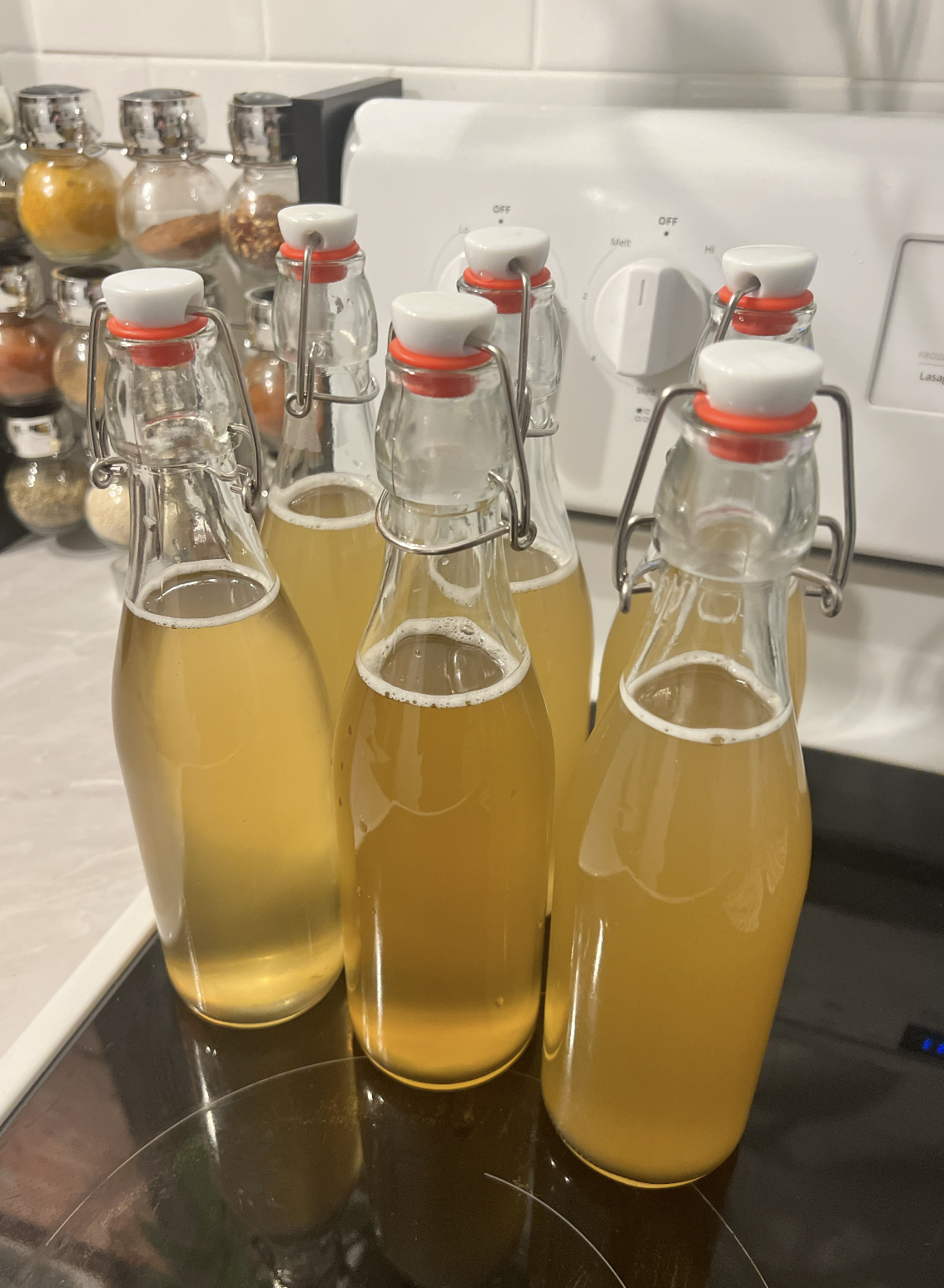
            <li>Pour the kombucha into sealable bottles (air tight to trap carbonation).</li>
            <li>Add flavouring (optional)</li>
            <li>Leave sealed at room temperature for 2 more days.</li>
            <li>Move to the fridge to stop the fermentation</li>
            </ol>
            
            <p>Enjoy! </p>

            <img src="http://brandontoner.ca/images/kombucha_bottles.png" alt="bottled kombucha"/>
        ]]>
    </content>
</entry>
<entry>
        <id>https://brandontoner.ca/garminshare</id>
        <link href="https://brandontoner.ca/garminshare"/>
        <title>How to Share Your Garmin Workout</title>
        <published>2023-05-23T08:00:00-04:00</published>
        <updated>2023-05-23T08:00:00-04:00</updated>
    <content type="html">
        <![CDATA[
            <p>
                The Garmin Connect app will allow you to create a custom workout, but it does not allow you to share that workout with someone else.
            </p>
            <p>
                Fortunately, there is a workaround for this using a Google Chrome web extension.
            </p>
            <h3>Steps to Export:</h3>
                <ol>
                <li>Download <a href="https://chrome.google.com/webstore/detail/share-your-garmin-connect/kdpolhnlnkengkmfncjdbfdehglepmff/related">"Share Your Garmin Connect Workout"</a> from the Chrome App Store</li>
                <li>Visit the <a href="https://connect.garmin.com/">Garmin Connect</a> web application.</li>
                <li>Create a workout (Training & Planning → Workouts → Select "Create a Workout" → Follow the steps)</li>
                <li>Once finished, save the workout and give it a name.</li>
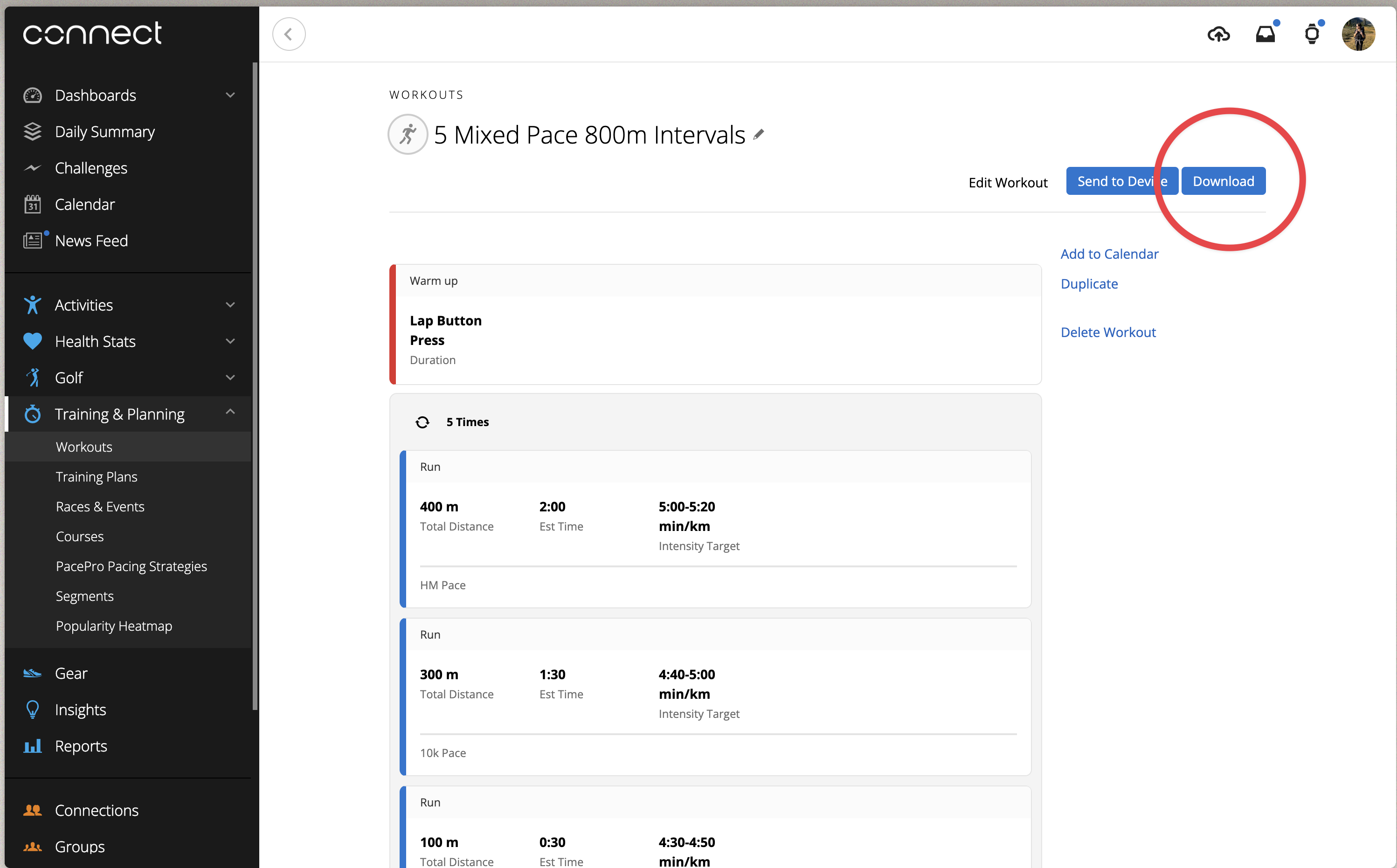
                <li>Click the download button (created by the extension)</li>
                <li>Share the JSON file with whoever you'd like to share the workout with (e.g. attach to an email or FB post)</li>
                </ol>
                <figure>
                    <img src="https://brandontoner.ca/images/garmin_export.png" alt="Export">
                    <figcaption>Exporting a Workout</figcaption>
                </figure>
            <h3>Steps to Import:</h3>
                <p>Note: Ensure you (or the person importing the file) has <a href="https://chrome.google.com/webstore/detail/share-your-garmin-connect/kdpolhnlnkengkmfncjdbfdehglepmff/related">the extension</a> downloaded and installed.</p>
                <ol>
                <li>Visit the Garmin Connect web application (as above).</li>
                <li>Go to Training & Planning → Workouts</li>
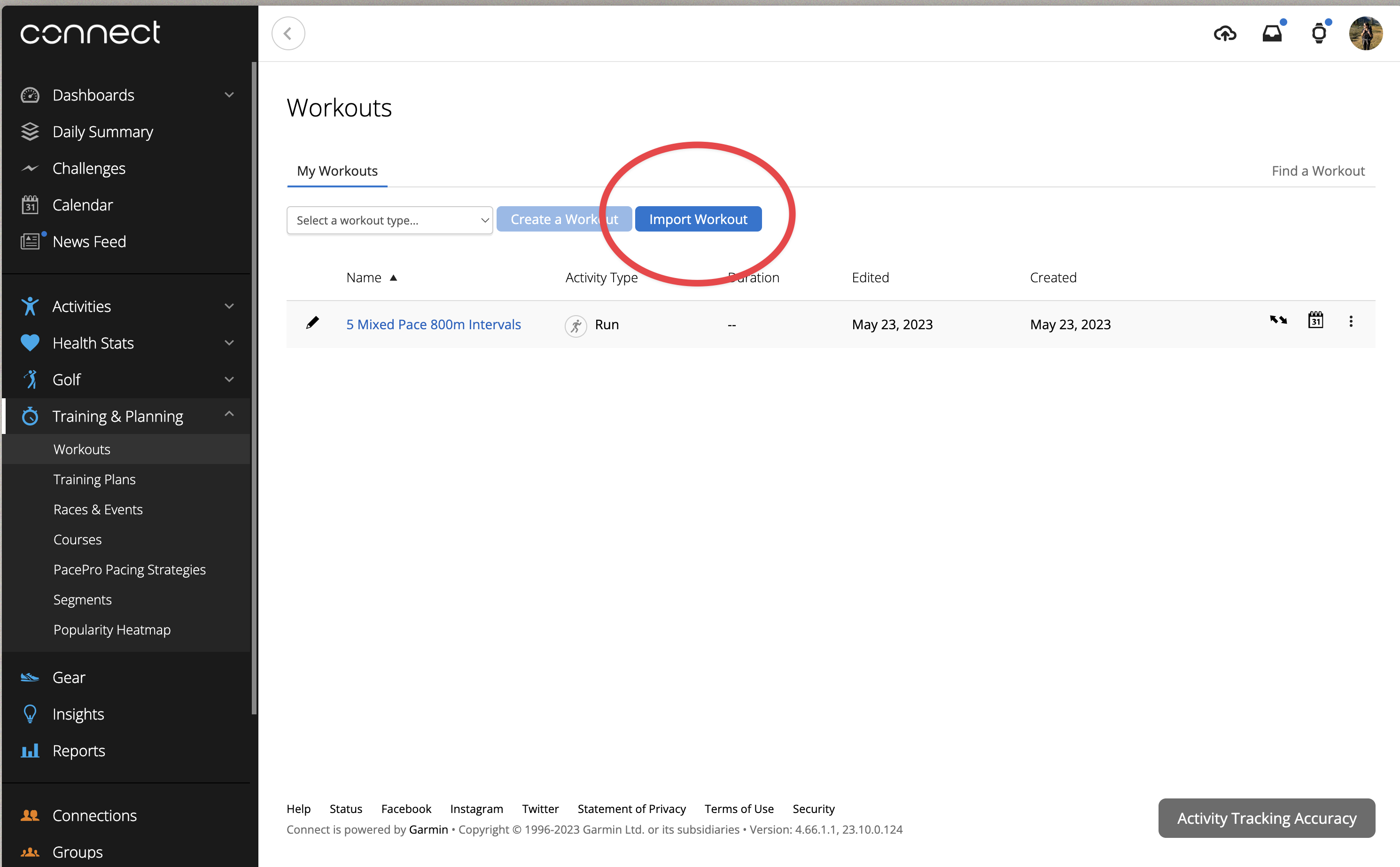
                <li>Click "Import Workout"</li>
                <li>Select the JSON workout file.</li>
                <li>Voila!</li>
                <li>Once you have the workout in Garmin Connect, it should be available to send to your watch/device.</li>
                </ol>
                <figure>
                    <img src="https://brandontoner.ca/images/garmin_import.png" alt="Import">
                    <figcaption>Importing a Workout</figcaption>
                </figure>
        ]]>
    </content>
</entry>
</feed>